Google Ads now includes Nano Banana Pro inside Asset Studio, placing AI-generated visuals directly into your campaign workflow.
That means smoother creative, easier edits, and more variations to test without waiting on production. It sounds like a sweet upgrade, and in many cases it is. The part worth paying attention to is what happens after those visuals are created.
Creative is no longer the slow step. The pace picks up, and the focus moves to deciding what actually deserves to run.
What Nano Banana Pro Is
Nano Banana Pro is Google’s advanced image generation model, powered by Gemini and built directly into Google Ads through Asset Studio.
It allows you to create and edit visuals using prompts instead of traditional design workflows. Instead of briefing a designer or waiting on revisions, you can generate, adjust, and build variations in the same place your campaigns live.
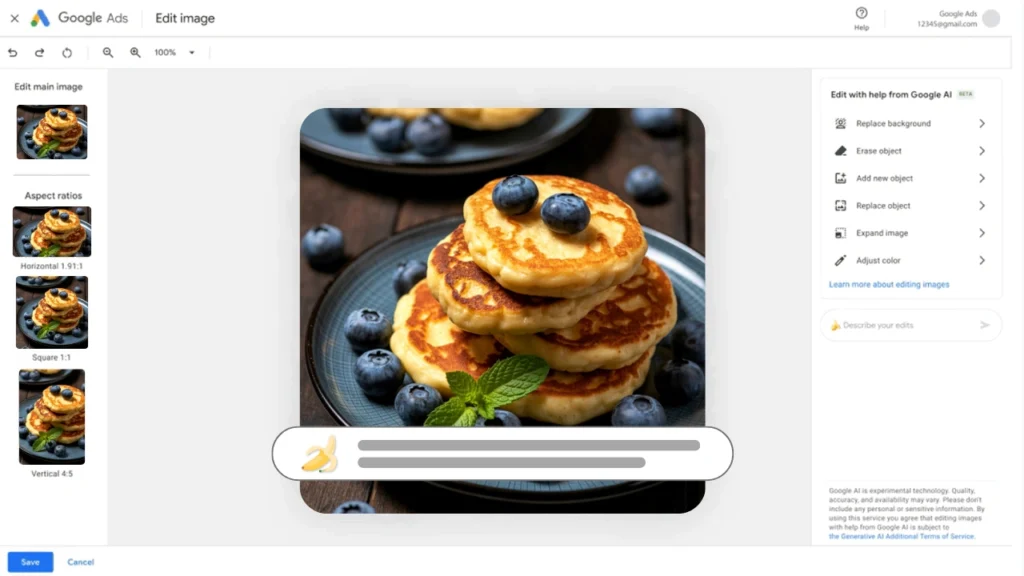
Inside Asset Studio, you can:
- Generate new images from prompts
- Edit existing assets without restarting
- Create multiple variations for testing
- Build visuals without leaving Google Ads
It keeps the process moving without adding extra steps.
What You Actually Get From It
Nano Banana Pro brings more than quick output. It gives you more room to test, adjust, and keep campaigns moving without getting stuck in the usual sticky spots.
Faster Iteration Without Rebuilding
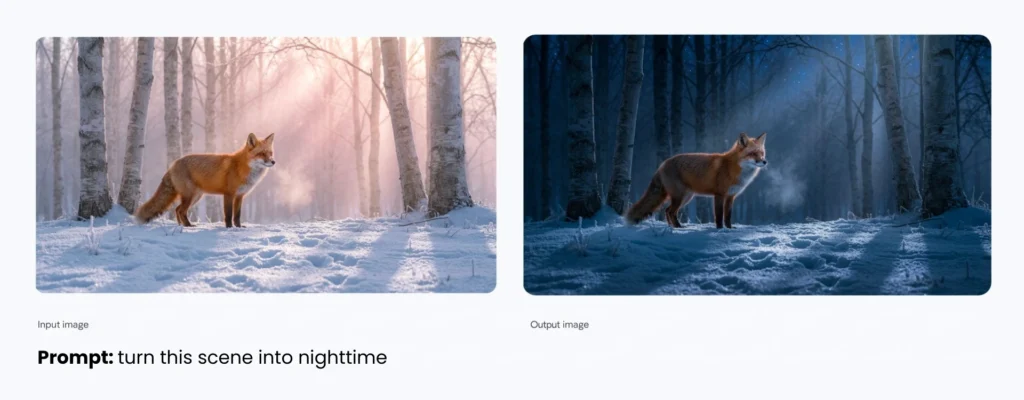
You can adjust visuals using prompts, which makes it easy to create multiple versions of the same concept. A seasonal update, a new background, or a lighting change can happen in minutes. This makes it easier to build stronger Google Ads assets, and keep your campaigns fresh and a little more tempting without slowing down production.
Visual Quality That Holds Up
The model focuses on detail. Textures, lighting, and product elements stay consistent, helping visuals feel closer to a polished shoot instead of something pieced together.
Text That Is Clean and Usable
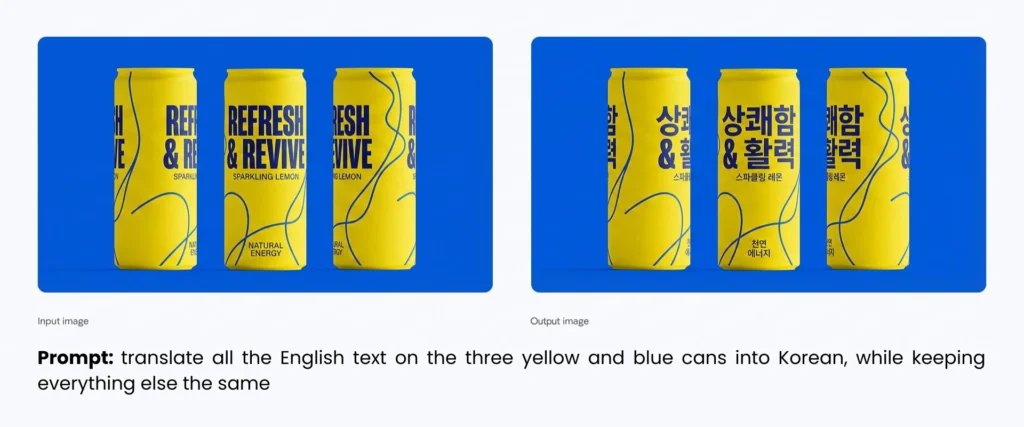
Text inside AI-generated images has been unreliable for a long time. Nano Banana Pro improves this by producing readable, accurate text directly in visuals, including longer phrases and multiple languages.
Multi-Product Creative in One Asset
You can generate a single image that features multiple products without forcing them into awkward layouts. This works well for bundles, collections, or ecommerce ad campaigns.
More Control Over the Final Look
Camera angles, composition, lighting, and styling can all be adjusted within the same workflow. You can refine the output until it matches the direction of your campaign.
More Creative ≠ Better Performance
Nano Banana Pro makes it easier to create visuals. What happens after those visuals are created is where results are actually decided.
More creative means:
- More variations entering campaigns
- More signals feeding automation
- More decisions about what stays and what goes
That can improve performance, or create clutter that slows things down.
Campaigns used to be limited by production. Now the limit is how much you can manage effectively. The brands that benefit will not be the ones producing the most images. They will be the ones choosing better assets to test and scale.
Where Nano Banana Pro Works Well, and Where to Be Careful
Nano Banana Pro is strong for speed, variation, and early-stage creative. It performs well when you need to generate options quickly and keep campaigns moving.
It is especially useful for:
- Seasonal updates and promotions
- Lighting and style variations
- Product-focused visuals for ecommerce
- Asset-heavy campaigns like PMax or Display
Some areas still need a closer look before going live. So, keep an eye on:
- Inconsistent handling of logos or brand-specific elements
- Overly literal interpretations of prompts
- Visual combinations that feel slightly off
The tool can generate a lot of options. Deciding which ones actually belong in your campaigns is still part of the job.
How to Use Nano Banana Pro Without Creating More Work
Nano Banana Pro can generate a high volume of creative in a short amount of time. That speed is useful, but it can also lead to a pile of variations entering campaigns without a clear direction.
The goal is not to create more. It is to create with purpose and keep your campaigns focused.
STEP #1
Start With a Clear Direction
Before generating anything, define what the visual needs to communicate. This could be highlighting a product feature, supporting an offer, or reinforcing a specific message.
Without that starting point, outputs tend to drift. What looks like a strong image on its own may not actually support the campaign it is meant to serve.
STEP #2
Create Variations That Actually Tell You Something
Generating variations works best when each version has a reason behind it. Small visual changes can influence how attention is captured and how clearly the message comes across.
It is easy to create ten options that look good at first glance. It is harder to create a few that give you useful feedback once they are live.
STEP #3
Review With Your Brand in Mind
AI-generated visuals can look polished at first glance. A closer look often reveals small details that feel slightly off, whether it is product accuracy, tone, or overall presentation.
These details tend to show up after launch, when performance is already being affected.
STEP #4
Keep Your Campaign Structure Clean
Adding too many variations at once can make it difficult to read what is actually working. When everything is tested at the same time, performance data becomes less clear and harder to act on.
This is where many campaigns start to lose direction, even when the creative itself looks strong.
STEP #5
Keep Your Campaign Structure Clean
Once assets are live, performance data begins to show which visuals are connecting. The challenge is knowing what to adjust, what to keep, and what to build from next.
Without a clear approach, it becomes easy to keep generating new creative instead of improving what is already there. This is where the process starts to matter more than the tool itself, especially for businesses looking for ongoing Google Ads management support.
How to Access Nano Banana Pro in Google Ads
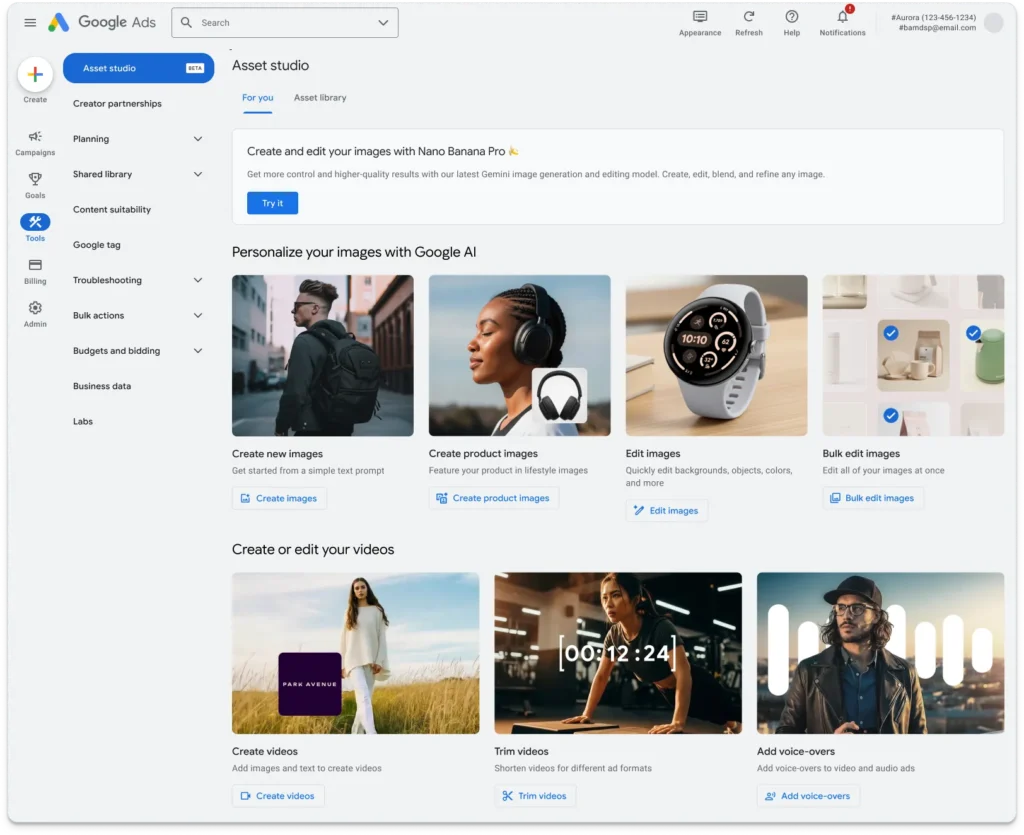
Nano Banana Pro is available directly inside Google Ads through Asset Studio.
To access it:
- Go to Tools in your Google Ads account
- Open Asset Studio
- Select the Google AI image generation option
- Start creating or editing visuals with prompts
For most active Google Ads users, the tool is rolling out as part of the platform, which means there is no separate setup required.
In many cases, you can start using Nano Banana Pro without an additional subscription if you already have access to Google Ads. Availability may vary depending on account access and rollout status.
When Creative Is Easier to Produce, Direction Matters More
AI has made high-quality visuals more accessible. You can create multiple assets in a fraction of the time it used to take, which makes it easier to test and launch campaigns faster.
That creates a different kind of challenge.
If all brands can create polished visuals, what makes you stand out? The difference comes down to how well those visuals match the message, the offer, and the audience.
The tool helps you move faster, but the strategy behind it determines what actually performs.
Ready for Sweeter Campaign Performance?
Nano Banana Pro makes it easy to create more, and we make sure what you create actually earns its place in your campaigns.
From creative direction to campaign management, we handle the testing and refinement so your ads stay consistent, focused, and a little more irresistible.
If you want results that stick, let’s get to work.